SakhaSync by Intellivane

Features and reports

Every number in your books, on your phone.

SakhaSync reads your TallyPrime books and turns them into clear reports, alerts and answers, updated every hour while Tally is open and checked against Tally every day. Here is what you get.

Live from Tally

Connect Tally once. After that SakhaSync keeps itself up to date while you work in Tally as usual.
  • Updated every hour, checked every day. A small, read-only SakhaSync add-on inside your Tally, on your PC or on cloud Tally, sends new and edited entries every hour while Tally is open, and checks every day that SakhaSync matches Tally. Until a check confirms them, figures are marked "not validated yet".
  • Every company, on its own. Each company you open in Tally shows up in SakhaSync automatically, with all its history.
  • One company or all together. Switch between companies, or see all of them added up on one screen.
  • Any device. Phone, tablet or computer, in any modern browser, or the Android app. iPhone app coming soon.
On cloud Tally? See how it connects →
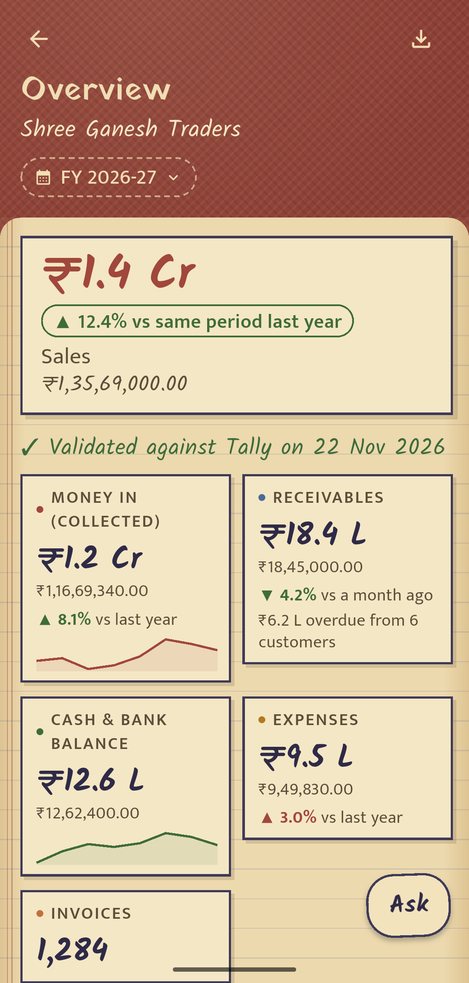
Business overview: sales, money collected, receivables, cash and expenses with trends
Business overview

Know what to look at first

You don't have to read every report. SakhaSync points to what needs your attention.

🌅

Today

The whole company on one screen: a one-line headline, the three things to do first, and a card each for cash, collections, payments, sales, profit, customers, stock, GST and more.

💡

Insights

What the books are telling you: stock that hasn't sold for 90 days, items about to run out, customers who have gone quiet, the slowest payers, high returns and stock near expiry.

📈

This year vs last

Sales, purchases and expenses month by month, against the same months a year earlier.

✏️

Entry changes

Entries that were edited, deleted or back-dated in Tally, with the old and new date and amount. Important ones are emailed to you at once.

Every report, from the same books

Built from your Tally entries and laid out for a phone. Tap a month, a customer or a ledger to see what is behind the number.

Business

  • OverviewSales, purchases, expenses and receivables at a glance, with trends and top customers.
  • Sales and PurchasesBy month, by customer or supplier and by product, against last year.
  • Profit marginsThe margin you make on the goods you sell, by product and customer.

Money

  • Receivables and PayablesWho owes you and whom you owe, with the age of each bill, from 0-30 days to over 180.
  • Cash & BankCash in hand and each bank balance, money in and out by month, and where it came from and went.
  • Cash flow, 30 days aheadWhat's coming in, what's going out and when cash could run short, week by week, from the due dates in your books.
  • ExpensesDirect and indirect expenses by month, with the biggest expense heads.

Accounts

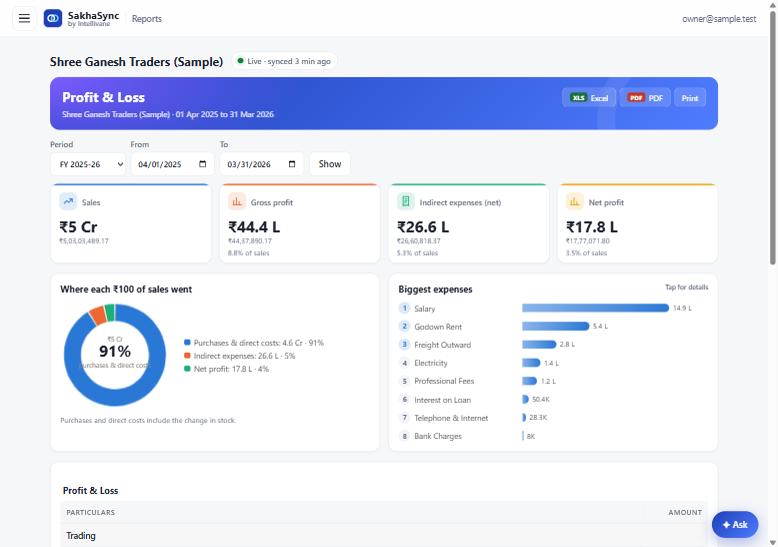
  • Profit & LossStraight from Tally, with where each ₹100 of sales went.
  • Balance SheetWhat the business owns and what it owes.
  • Trial Balance and Day BookEvery group and ledger with its balance, and each day's entries.
  • LedgersTap any ledger name to see its entries.

Stock and tax

  • Stock summaryOpening, inward, outward and closing quantity and value, item by item.
  • GSTGST on sales and purchases, net payable and paid.
  • GSTR-2B matchUpload the GSTR-2B file from the GST portal and see which purchase invoices match, which differ, and where tax credit is at risk.
  • TDSTDS deducted by section and party, and what's due by the 7th.

Excel and PDF. Reports can be downloaded as Excel or PDF. Or just ask: Ask SakhaSync answers from the same books, in Hindi or English.

Alerts that matter

An email at the time you choose, listing only what needs your attention:

  • Customers' bills overdue
  • Supplier bills due
  • Cash or bank below a limit
  • Stock near expiry
  • Stock running out
  • Stock not selling
  • Entries changed in Tally
  • Tally not syncing

Collect faster

Payment reminders in one tap, for every customer who owes you money.
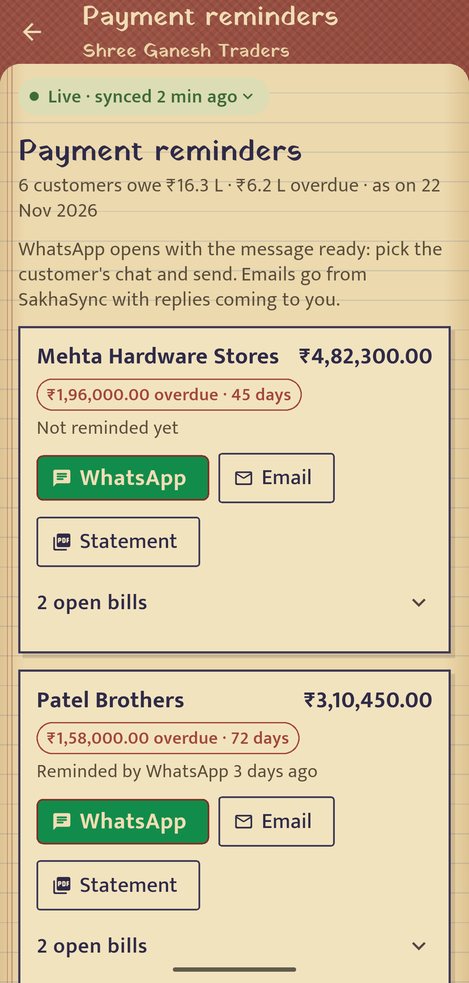
  • WhatsApp. A ready WhatsApp message for the customer.
  • Email. An email with the customer's open bills.
  • Statement. A statement PDF for each customer.
Payment reminders: customers who owe money with WhatsApp, email and statement buttons
Payment reminders

On a computer too

The same reports, with more room. Real screens of SakhaSync, filled with a sample wholesaler's books.
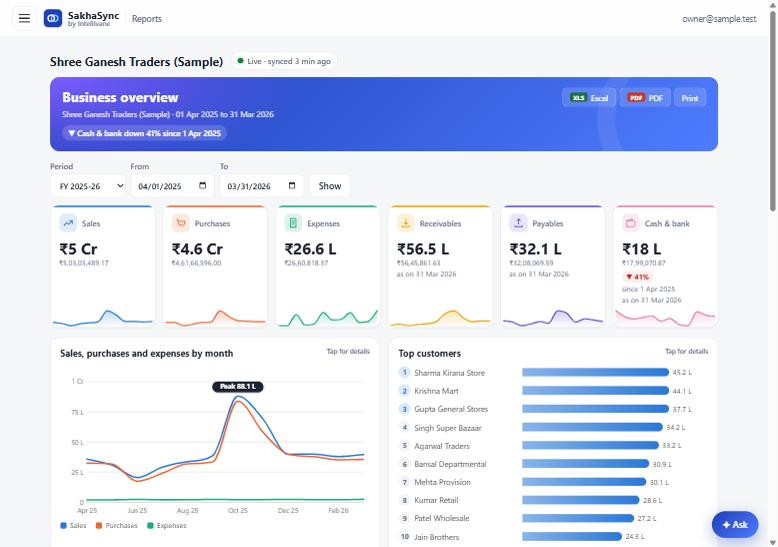
Overview on a computer: headline numbers, monthly chart and top customers
Overview on a computer
Profit and Loss with where each 100 rupees of sales went
Profit & Loss, straight from Tally

Sample business and figures, for illustration.

See your business clearly, today.